
Can $5.00 a day for my Facebook ad works ?
WILL IT WORK ?
$5.00 a day budget for your FB ads can work for you. For those who have been investing in FB ads regularly, you know that there is a minimum budget set for your business. Like mine, it is $5.17. That's the minimum amount I have to invest per day.

WHY WILL IT NOT WORK ?
$5.00 a day budget for your FB ads can work for you. For those who have been investing in FB ads regularly, you know that there is a minimum budget set for your business. Like mine, it is $5.17. That's the minimum amount I have to invest per day.
For beginners, count on your lucky starts, your first few Facebook campaigns, you can start making your FB ads for just $1.00 a day.
HOW CAN I MAKE MY $5.00 A DAY FB ADS WORK HARD FOR ME ?
The very first step, that I always share with other business owners is to understand your BUYER's JOURNEY. Very important.
There are basically 3 stages in a BUYER's JOURNEY. (refer to the picture below)

With FB ads, you can reach out to more audience. By now, you should also know that your FaceBook page has limited audience reach. We are are talking about 2-6% of your FB page likes.
With FB ads at $5.00 a day, I guarantee you are reaching out to more than just 6% of your FB page likes.
For you to achieve the RESULTS at the end of your BUYER'S JOURNEY, they must go through the 3 stages of AWARE - CONSIDERING - DECIDED. For more details about this, you can actually Google about it. I am trying to keep things simple here.
With FB ads and $5.00 a day, it should look something like this. (photo below is for illustrations purpose only.)

#1 - SPECIFIC AND TARGETED
In order to ensure your $5.00 to work hard for you, your offer has to be SPECIFIC. You got to address buyer's needs, wants and their pain. You got to show how you can solve their problems and fulfill their needs.
Be specific with your message or offer.
Next, you have to reach out to TARGETED audience. We are talking about demographics. If you have a perfect customer, a real life customer, use them as your customer profile. If you don't, you can make it up.
Create a customer profile with these details :
- Gender
- Age
- Location
- Their interests
- Language
- Relationship status
As for my business, Orangefill, my customer profile is
- Female
- Age between 22 - 29 years old
- Residing in Singapore
- Online Shopping, Weddings and Marriage
- English (ALL)
- Single, Engaged, In A Relationship, Open Relationship
When you are being SPECIFIC and TARGETED, you are maximizing the very opportunity where your FB ads will meet with people that will highly take action. Not only that, you are also optimizing your budget of $5.00 a day.
#2 - MOBILE PLACEMENT
There is only one thing for you to focus. Higher penetration into the Facebook audience size.
The more people your FB ads can be served to, the higher potential of you generating leads and sales.

The photo captured above shows how many Facebook users in Singapore based on my customer profile settings access Facebook via mobile.
59% access Facebook via mobile compared to 4% access Facebook via Desktop.
#3 - CLEAR CALL TO ACTION

In this FB ad I created for my client, I included 3 ways on how audience can get in touch. FB message, Email and Calling.

** Sorry that my copywriting is in Malay language. Direct translation, " Want to know about our wedding video services, visit www.orangefill.com. "
Having a CLEAR CALL TO ACTION at the end of your offering, your audience will not be left hanging.
If you want your audience to take action, you must tell them what to do.
#4 - SCHEDULE THE TIMINGS
To further maximize your $5.00 a day budget, I would recommend you to schedule your FB ads timings.
You can check out "Best Timing To Post On Facebook" as a reference. So far, this schedule works best for me.
- Wednesday - Sunday
- 1000 hrs - 0000 hrs
- 21 days duration
You are only able to schedule your FB ads timings after you change your daily budget to lifetime budget.

Only then, you are able to schedule your FB ads timings.

4 POINTERS YOU SHOULD TRY NOW.
Apply these 4 pointers and you are good to go!
I sincerely hope this blog post will help you in any way it can. Let me know what you think by leaving a comment.

If you would like to get in touch with me, fill up the form below.
You might be interested in Elton's success story with FB Ads.


How To Re-Target Your Audience using FB Ads ?
WHY SHOULD YOU RE-TARGET YOUR AUDIENCE ?
You are able to advertise to people who have shown interests or have visited your website with FB ads. Thus, you are able to place your brand in their mind.

WHY SHOULD YOU RE-TARGET YOUR AUDIENCE ?
1. You are able to advertise to people who have shown interests or have visited your website. Thus, you are able to place your brand in their mind.
2. You are able to help your audience in decision making with your content/values/benefits. Usually, audience would take their time to make decision. Comparing prices, visit your website a couple more times, evaluating their needs and desire, etc.

You are targeting the pink audience.
HOW DO I RE-TARGET MY AUDIENCE USING FB ADS ?
#1 - RE-TARGET FRIENDS OF PEOPLE LIKED YOUR FACEBOOK PAGE
When you create your FB ad, under Audience settings, you can select PEOPLE WHO LIKE YOUR PAGE or FRIENDS OF PEOPLE WHO LIKE YOUR PAGE.
If you have less than 20 000 Facebook page likes, I would recommend you to select FRIENDS OF PEOPLE WHO LIKE YOUR PAGE.
Example for my business, Orangefill, when I target couples who have liked my page using FREINDS OF PEOPLE WHO LIKE YOUR PAGE, I am able to target their friends as well. Generally, when my couples are planning for their wedding, you can bet their circle of friends too are planning for their weddings as well.

#2 - RE-TARGET AUDIENCE WHO HAVE VISITED YOUR WEBSITE
Do you realize, when you visited a website and you logged into your Facebook account, magically that particular brand appear in your Newsfeed ?
You can do a self test. I can guarantee, the brand's FB ad will appear in your Newsfeed.
What just happened is that, when re-targeting, you are constantly placing your brand in your audience mind.
HOW DO I RE-TARGET MY WEBSITE AUDIENCE ?
Bear with me, this is going to take a little longer.
1. If you are not using Google Chrome as your web browser, I suggest you install it now.
2. Install FB Pixel Helper extension. What this extension does is, it will let you know if you have installed your FB pixel correctly.


The green bar will turn to red if your Facebook Pixel is not install properly or loaded successfully.
3. Create your FB Pixel. You have to go to Facebook Ads Manager. List all the tools. And select Pixels.

4. Select Facebook Pixel. You should be able to see the Create A Pixel button.

Don't mind the Conversion Tracking Pixel (old). It will be unavailable late this year.
4. You should see this pop up. Name your Facebook Pixel.

5. Your Facebook Pixel will be ready in a jiffy.
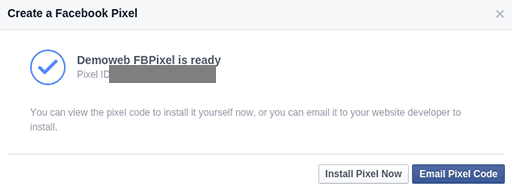
6. By now, Facebook will show your Facebook Pixel code which you need to copy.
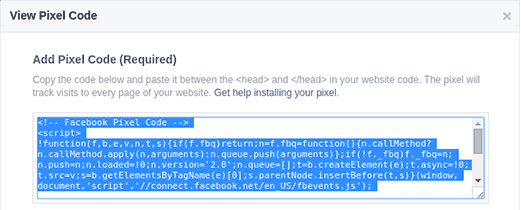
If not, you can select View Pixel manually.
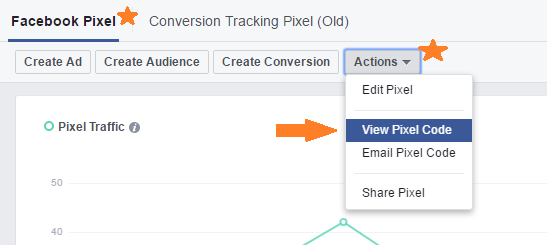
8. Inject the copied code into your website. This can proved to be challenging. But take your time to find out how.
In my case, I am using Squarespace and it is quite easy to inject the code. You can click on this link to follow step by step.
If you are using Weebly, click on this link.
If you are using Wix, click on this link.
If you are using Shopify, click on this link.
9. Now you are ready to use your Facebook Pixel.
Well, not quite actually. Facebook Pixel is just a code. A code that can collect data. You need to store the data somewhere.
Therefore, you need to create Custom Audience. This is how you should go about doing it. Select Audience from your Facebook Ads Manager drop-down menu.

Select Custom Audience from the Create Audience drop-down menu.

You will see a pop-menu. Select Website Traffic.

You will be brought to the next option. To keep things simple and easy,
- Website Traffic - Select Anyone Who Visits Your Website option.
- Input your website domain.
- Select 180 days. This is the maximum number of days for the pixel to store the data.
- Name your audience.
- Click Create audience.

10. You are almost there! In order to activate your Website Custom Audience, you will need at least 20 visitors to your website. Once your have enough visitors, the red circle will change to green circle.
Once you get the green circle, now you can use Facebook ads to re-target your website visitors.

BUT WAIT, WHAT'S THE FB PIXEL HELPER ALL ABOUT ?
Basically, it help to let you know if you have installed the FB pixel correctly and it is working. If not, you need to refer my #8 for references.

Your turn. Try to re-target your audience. Let me know what you think.

- If you have any questions about making your own FB ads, drop me an email.
- If you ever need a one to one training session with regards to making FB ads for your business, leave me a message.
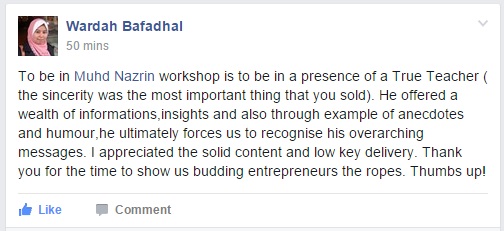

5 WAYS TO MAXIMIZE YOUR FACEBOOK PAGE
CHANGE YOUR FACEBOOK PAGE COVER PHOTO
Why ? It is an opportunity for you to tell your visitors about who you are and what you doing in just seconds. Most of us are just putting up photos without paying attention to optimize them.
1. CHANGE YOUR FACEBOOK PAGE COVER PHOTO
Do you agree ? When I first started to promote my business on Facebook, I was clueless about how to go about it. I was doing things blindly.
If you have a Facebook page for your business, I encourage you to implement right away.
Change your Facebook page cover photo.
Why ? It is an opportunity for you to tell your visitors about who you are and what you doing in just seconds. Most of us are just putting up photos without paying attention to optimize them. Below are some photos I created and used for my own business.

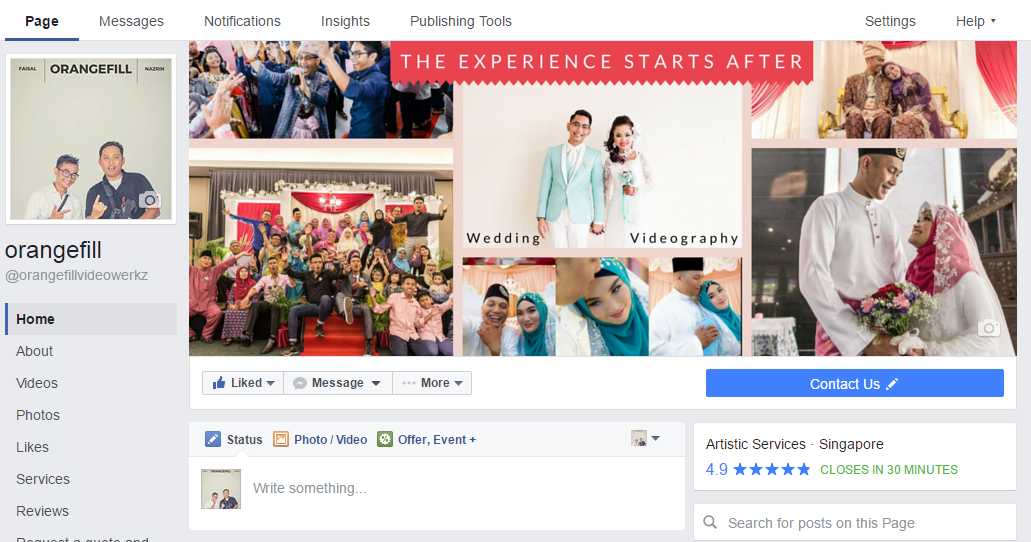
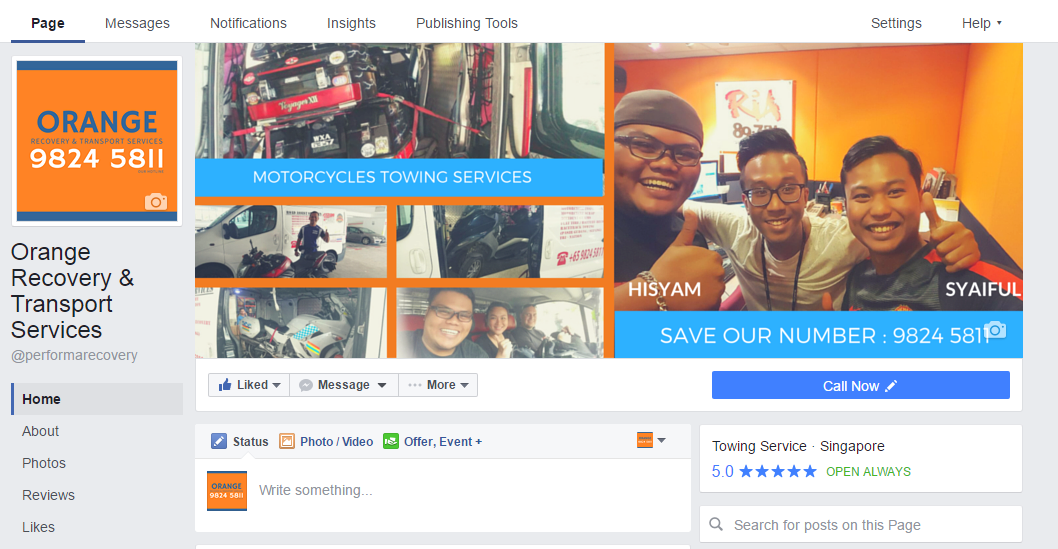
How to do it ? It is very simple.
1. Create an account with Canva - trust me, you don't need to be a photoshop expert.
2. Select the pre-format template which is Facebook Cover.
3. Start designing your Facebook Cover Photo.
4. Don't forget to include some headlines or taglines that can pre-qualify your Facebook page visitors.
2. PERSONALIZE YOUR PROFILE PHOTO
Put a face to your business. In my opinion, this helps to break barriers. After all, you are not a robot.
If you decided that you will not to, there is nothing wrong as well. What we want to try to achieve here is, to encourage engagements. To install confidence and security for audience to interact or to enquire.
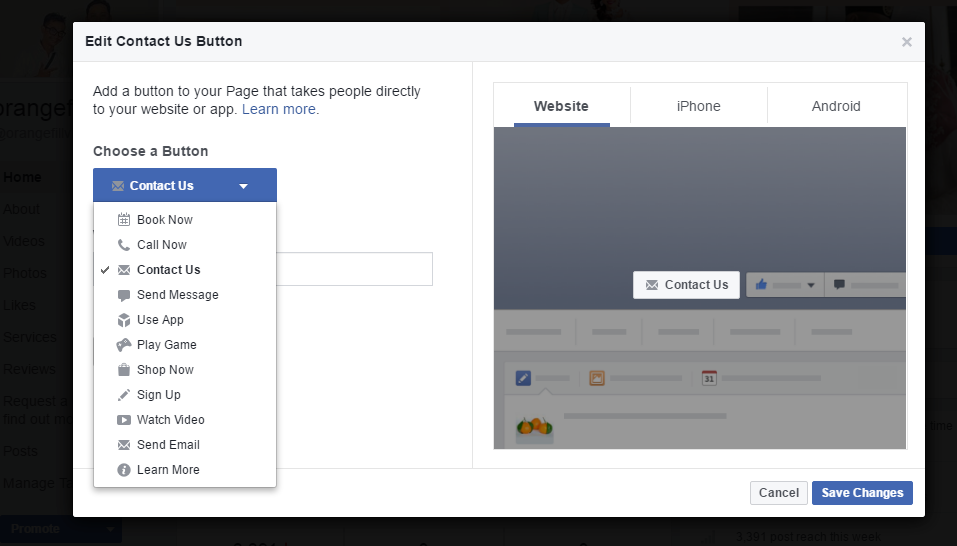
3. CREATE YOUR BUTTON
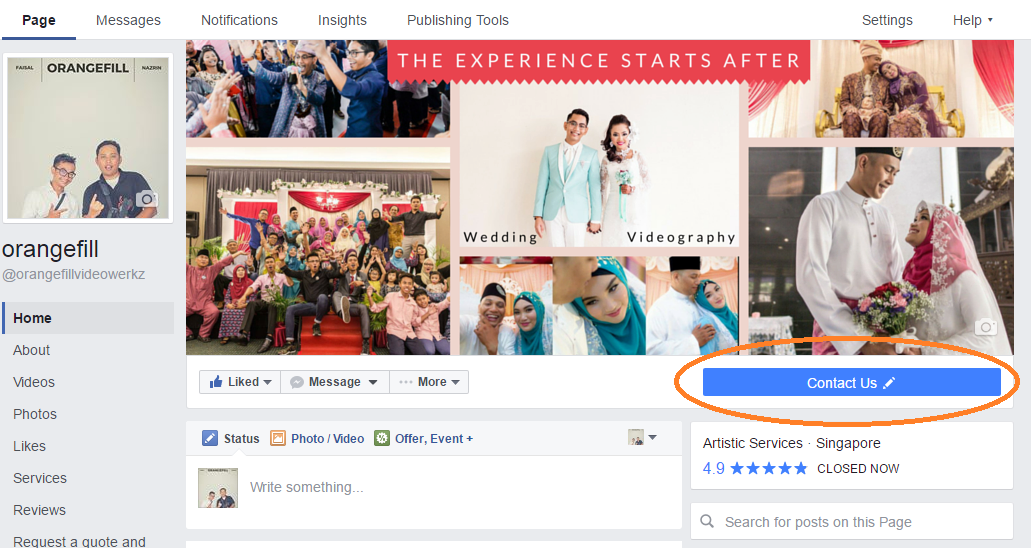
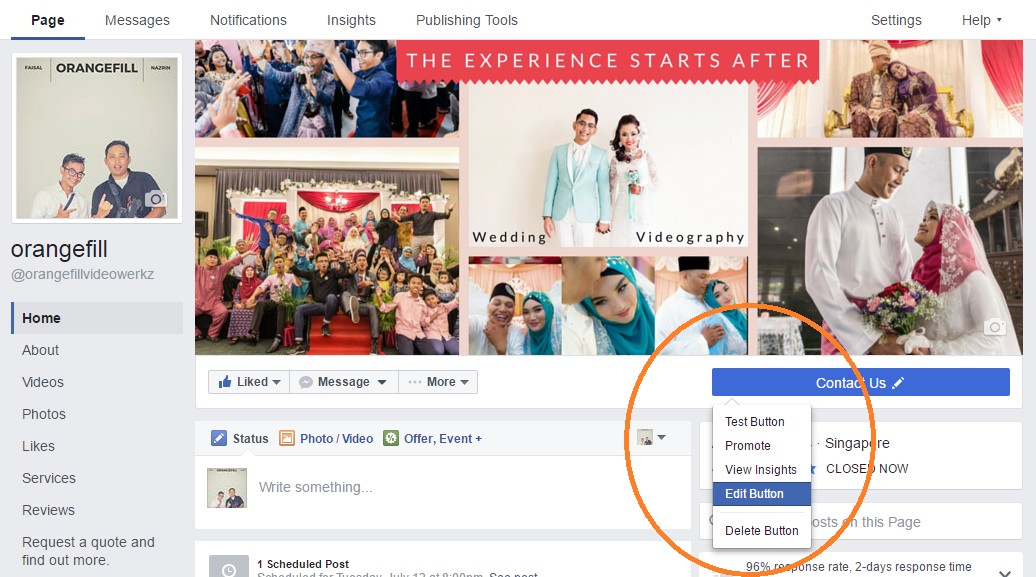
Simply put, you want your audience to take action. The button is highlighted so to attract your audience attention.
And there are number of options for you to choose.
The key point here is how do you want to interact, engage and close your sales.
If you prefer them in calling you, select Call Now. This works best if you are running a F&B outlet and for people making reservations.
You can choose Shop Now if you are selling handbags, shawls, etc. This will lead your audience to your website.
4. CONSISTENCY IN POSTINGS
The challenges faced by most business owners, even me, having enough material to post.
There will be months where we post a lot. Then, there will be also months that we won't be posting anything.
Make it CONSISTENT and make it a habit.
Start with one post a month. Yes, you may say that it is too little. We are going for the CONSISTENCY here. At the end of one full year, you will have 12 posts.
One post a month, it is something that you can really manage, don't you think ? If you can do two posts a month, go ahead. Three posts a month, go ahead. Post daily, go ahead.
When you are being consistent, with time, your audience will notice your schedule. They will know when to check back for more.
As long as you can be CONSISTENT, you should not stop at nothing.
5. PROMOTE, PROMOTE and PROMOTE
Do you know when you post on your Facebook page, Facebook will only promote your post for the next 3 days ? Not only that, it will only limit its reach to just about 2% of your followers.
Example, if you have 1000 page likes, you can expect that for 3 days your post will be seen by by 20 people. That's the reason you need to promote your offer as much as you can.
The best way to do it - investing in Facebook ads.
a - Define your target audience
b - Aim for an audience size of 20 000 people, for a start.
c - Your budget will determine your audience size. Start with $5 a day budget.
(if you are doing it for the first time, count on your lucky stars, you are able to create Facebook ads for $1 a day.)
d - Run your Facebook ad for a duration between 14 days - 21 days.
e - Don't forget to measure your Facebook ad data. By measuring and keeping track of its performance, it will help you understand your audience better and make changes to your offer.

Paid FB ads vs Organic FB post - This is a graph that I created for my client for their FB ad for 23 days. High green bars are the results of paid FB ads. Those low bars below 1000 are the results when I turned off their FB ad. The more people see your offer / content, the higher chance you will get sales.
Well, what do you think ? Your turn.

THE RESULTS ARE ASTONISHING!
Wedding Arqhitect is generating 10 leads a day.
The Camel Caravan is generating 200 leads wihin 14 days WITH A BONUS! (I will share later)